You may run into an issue when trying to upload an avatar after you’ve converted it to quest.
It Goes Something Like This:
- You have material swaps in VRCFury, but those material swaps contain materials with pc only shaders.
- Since converting to quest only works with what is physically on the avatar at the time of conversion, it doesn’t convert those materials to quest compatible. They’re added in while VRCFury attempts to build the avatar.
- When VRCFury attempts to build the avatar, it adds those non-quest shader materials and the VRChat SDK says “Hey, wtf is this?”.
How to Fix it:
- Duplicate the material causing issues.
- On the duplicate material, change the shader to something quest compatible.
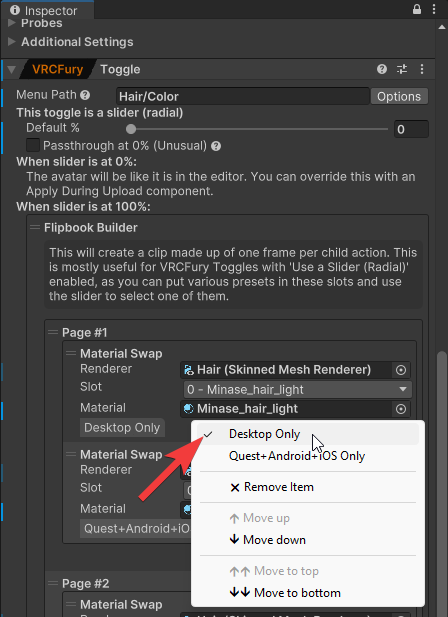
- On your VRCFury toggle component, right click your existing toggle and make it Desktop only.
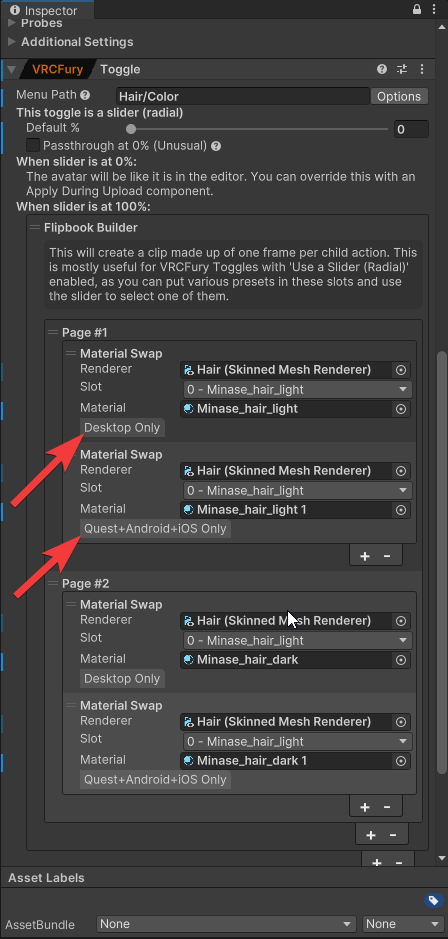
- Add another material swap, give it the quest material, then make that one Android only.
- In the example below, I’m doing this with the flipbook builder. You can see I have one material swap that will only apply for desktop mode, and now I also have one that will only apply for android mode. These are both on the same page so it will apply both - but only the applicable one for the platform.